Content is king. At least that’s been the mantra of marketers for several years.

Is this really so? The answer is mixed. Because content is only “king” if it is created right. It must be “picked up” by search engines when consumers conduct generic searches for information related to the topics content writers offer. 

The problem is this: many content writers, especially those who are relatively new to the “business,” do not understand all of the facets of SEO. And they make mistakes that send their pieces out into the content “ocean,” never to be found and read. 

Here are the common mistakes that new content authors tend to make.


1. Not Understanding Current SEO Algorithms

These are not published for everyone to see. And they have evolved over time. These evolutions are the result of a couple of things. Google wants to make sure that the content it ranks well is actually providing what searchers want. And technology has developed that makes it easier to comb through content and decide if it is valuable.

What content authors should know is this: Google wants to see high-quality content that provides real value. And its criteria for real value include meeting needs and addressing the pain points of readers along with popularity and relevance of the content topic. While a content author may not know all of the ranking details, these criteria should drive all that he writes.

2. Making Mistakes With Keyword Use

In times past, the more keywords an author could get into a piece of content, the better. Google is much smarter than that now. It actually punishes content that is stuffed with keywords. And, because searchers are now using search phrases rather than just single words, algorithms have changed to meet those behaviors. With this in mind, authors must do the following:

  • Research the most popular and relevant keyword phrases that searchers are using. There are plenty of tools out there like SEM Rush and Moz Keyword Explorer for this purpose.
  • Pick just a couple that is the most popular. Use them in the title, the meta description and, depending on the length of the piece, intersperse them naturally within the content. 
  • Don’t force a keyword phrase into content if it doesn’t just fall naturally within the context. 

3. Writing Like An Academic

In college, you wrote essays and papers. You had to use very formal and scholarly English. Now you are in the business of writing content for the normal and average readers. They don’t want lofty composition. They want creative, nuts and bolts English that they do not have to work to understand. 

  • Dump the complex sentence structures. Simple sentences do best.
  • Dump the “high-end” vocabulary. Use simple vocabulary that a 7th grader could understand.
  • Write your content as if you were writing a letter to a best friend. This is the style and tone you should use in your content.

If you are struggling to simplify your content, then use some resources to help you edit your content. Many writing services have copywriting experts to do this. Check out Grab My Essay or Studicus for starters. And use a tool like Grammarly or Hemingway Editor that will give you a reading level and suggest how to simplify your writing. 

4. Not Maintaining A Production Schedule

Readers who access your content want to see new stuff on a regular basis. If they don’t, they won’t come back. And traffic will suffer. Setting up a calendar is critical, along with topics to be addressed within that schedule.

Productivity can be an issue here, so use some of the great tools out there to keep you focused, on task, and meeting those deadlines. 

5. Not Knowing Your Audience

Smart marketers have developed personas of their ideal customers, and these should be used when writing content. When writers do not have an intimate understanding of their audiences, they will not produce content that will engage, educate, and even inspire them. When readers land on content that does not honor their preferences, they will bounce. Google does not like this. It means that traffic flow is not good. Good traffic means that visitors come and actually stay a while. 

Consider the difference in writing style and tone for millennials as opposed to senior citizens. The vocabulary and tone will be vastly different. Likewise, a piece of content for Red Bull will be totally different from one written for Rolex Watches.

6. Focusing On Product And Services Rather Than Customers And Value

It’s easy to fall into the habit of showcasing products or services, in order to get those conversions/sales you want. But today’s consumer is turned off by hard selling techniques. And Google is not excited about this type of content.

Instead, focus on consumer needs, pain points, and the solutions they want. What solutions does your product or service provide?

One of the best examples of this is Dollar Shave Club. They identified a problem – men using disposable razors and yet running out of them, forgetting to stop at the store to buy them, and then being forced to use an old dirty one. It set up a subscription service that would deliver razors to the door. Problem solved. It’s content, including an amazing initial explainer video, went viral. This is the kind of thing Google loves. 

Jim Jenkins, Content Manager for Trust My Paper, puts it this way: “We are in the business of providing writing products and services to our clients. We don’t ‘sell’ our products. We focus on what the client will get as a result of using our services – better grades in school, for instance. When we can solve their problems, we get their business and their recommendations.” 

7. Not Using Images And Media

One of the things we know about consumers today is that they want what they want quickly and easily. They don’t want to read walls of text. Anytime content can be delivered via photos, videos, and even some of the newer technologies of AR and VR, it will be a winner. There will plenty of shares, and traffic will increase. Google likes lots of traffic. It says that your content is popular and relevant.

Backlinks come from places outside of your site or blog. They come from related niches that have found your content to be valuable. Getting quality backlinks takes time but the more you get the better for your SEO rankings.

Courting reputable related businesses, publishing on their blogs, and getting them to put links to you in their content is important. A word of caution: Do not solicit backlinks from unrelated or questionable sources. You will be punished for this.

9. Not Including Social Proof

Consumers rely on other consumers for recommendations more than ever before. If you are not including comments, photos, and even videos of happy customers, then you are missing out on lots of traffic and, of course, sales. And that traffic translates to higher SEO rankings.

Don’t Panic

If you are new to this “world” of content, there is no reason to panic and think you cannot do it right. You can. And the more experience you have with content creation the better you will become. Take these 8 common mistakes to heart and make a commitment to avoid them.

Author Bio: Erica Sunarjo is a content writer and blogger for several venues, including the writing services Best Essay Education and Wow Grade. As an experienced content creator, she is a contributor to LiveInspiredMagazine. 

Remember Panda and Penguin? Back in 2011 and 2012, Google launched these two major updates that took the online world by storm. SEO was never the same again. Webmasters and website owners had to redesign their SEO strategies, work harder and pay attention to each new update rolled out by Google’s engineers.

Google BERT new update

This article will explain the following:


Google launches new updates to its search algorithm almost every month, but the major ones are only popping up every few years. BERT, the new major update for the search engine was announced on October 24th, 2019, and became active in the following days. According to the company, the update, nicknamed BERT, will affect about 10 percent of the queries, making it one of the most important updates in the last 5 years. But will it be as significant as the old Penguin or Panda? There is a lot of anxiety in the online world and everyone is waiting to see its effects. Let’s go over the specifics and see what BERT is all about…

BERT is an acronym and is short for “Bidirectional Encoder Representations from Transformers”. This already complex phrase is explained by an even more baffling one: according to the company, it is a “neural network-based technique for natural language processing (NLP) pre-training…” and it goes on and on…

Sounds a bit confusing, right?

Well, don’t worry about the technical wording – we’ll try to break it down and explain it in simple English in this article!

What is this new BERT update for Google’s search algorithm?

In short, the new update is designed to help Google better detect the intent of search engine queries. It’s focused on interpreting phrases instead of simple words. When a search consists of a phrase, Google will try to see it as a phrase and return the results based on how the phrase is created and sounds. This is because even the simplest phrases can have an entirely different meaning when compared to singular or random words.

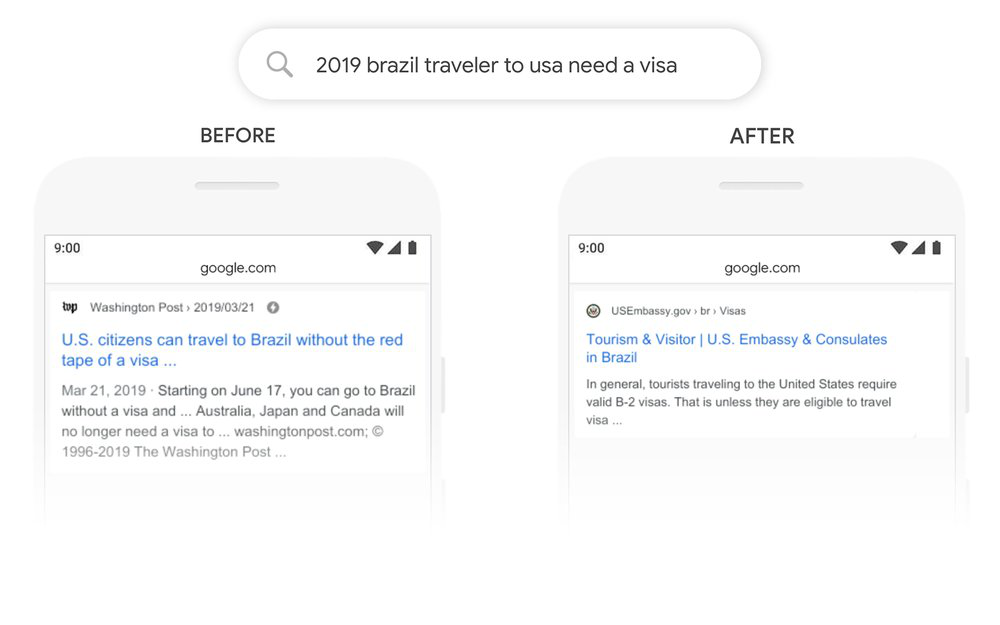
Here are some examples provided by Google to showcase this common issue

In this example, the difference between searching for information about traveling from the United States vs. to the United States is shown and interpreted by the search engine:

BERT Google Update

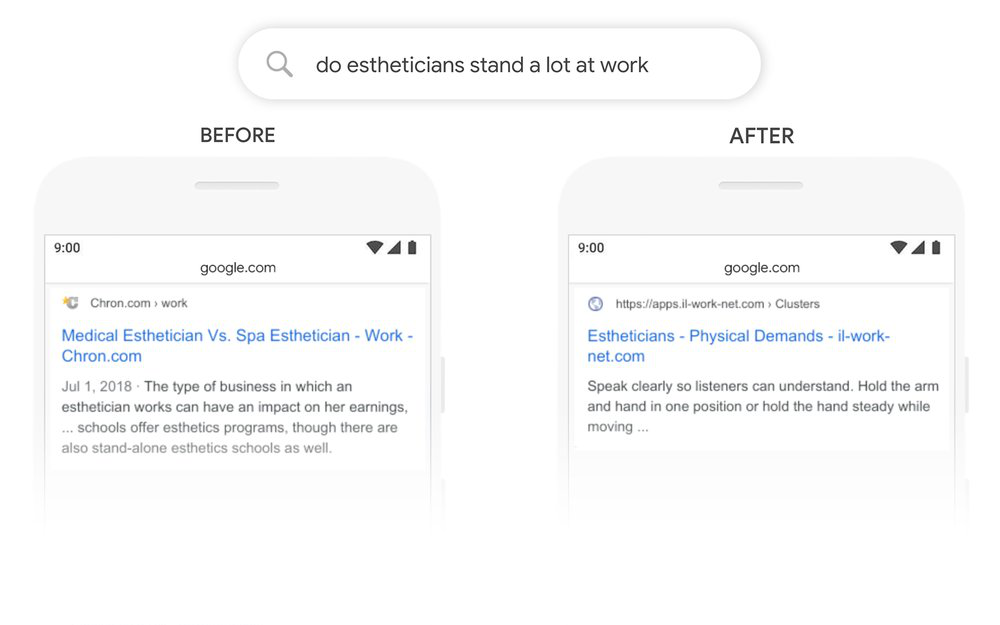
In another example, Google has previously misidentified the word “stand” as “stand-alone”, which is the wrong version for the search query. In this case, the searcher was looking for information about the physical demands of the job. With the BERT update, Google will better interpret similar queries, returning more accurate results.

BERT google algorithm update

As you can see, the results are better and the search engine detected what the person searched for and what type of results he or she wanted to get.

So, what does this new update mean for your SEO campaigns?

The first thing you’ll need to do after the release is to check whether there are any changes in the traffic to your web properties. Check if there is more or less traffic, particularly in the next few days, as the algorithm goes into full action. The major positive aspect of this update is that it won’t affect certain websites, as were the Penguin and Panda updates just a few years ago. It is designed to just make the search engine better understand the search query and the user’s intent.

The best way to take advantage of this new update is to have the right answers for the right questions on your website. So, if a person looks for specific information, he or she will find the right information. Essentially, this can be expanded into the old internet saying – content is king. It means you must have better content which actually provides good information to your readers. We believe that well-written, long-form, in-depth content will be the major winners of the BERT update. In fact, some websites are already noticing a change in their traffic, particularly for long-tail keywords (phrases with 3 or more words).

Your traffic is dropping – what should you do?

Bert Update Traffic

Ooops, you checked the traffic statistics after the update and… it’s bad news! It’s dropping. Okay, stay calm… But what should you do?

The first thing – don’t do anything, just stay calm until the dust settles. Every update works like a shock and will have some immediate effects which can change over time. This happens because Google launches the update and then will continuously work on it. Tweaking, reversing and slight modifications are very common for several weeks following an update, so the search results and traffic will vary a lot.

If your website is still dropping in traffic and there is no sign of stopping after several weeks, you can try doing this:

Detect the queries or keywords that might cause a sudden drop

Head over to the search console (Google Search Console – install it if you don’t have it) and run a comparison report. Select the time period which shows the amplest decrease in traffic. Next, click on queries and look where and for which keyword you lost the traffic. This page will show you the traffic coming in for each keyword and the stats for each one. If you want an additional tool to investigate, try using the ahrefs tool (ahrefs traffic change report).

Check what is ranking now

Look at the queries and determine which keywords and the type of content that still ranks:

  • is this content different when compared to the other types of content on your website?
  • Is it written differently? Does it bring up a new angle? Is it worded differently? – pay attention to any major difference
  • is it answering a user’s questions differently? If yes, how?

Tweak or change the content

This is the time to take action. If the tactics mentioned above don’t work, it’s time to change, modify and adapt the content on your website. Create new content, expand it, make it more diverse and see what Google actually wants. This tactic will be more laborious and will be long term, but hopefully, you will see positive results.

Conclusion

BERT seems to be the most important update for Google’s search algorithm in the past 5 years. Its effects on SEO are not yet fully understood, but it seems it is not focused on any sort of penalization. It is designed to understand users’ search intent better. It’s designed to create a better experience for the user.

The real professionals know that you can’t be an expert in everything. That’s why the best brands outsource their digital marketing to the real experts. A good SEM agency will plan and implement your digital marketing strategy from the ground up and will transform your brand’s online presence. But what about the costs? What are the usual SEM agency fees and how much should you expect to pay?

This articles will help you learn the following:


What are the Standard SEM Services Pricing Models?

There are many players in the digital marketing industry: full digital marketing agencies, SEO agencies, SEM agencies, social media agencies and many other types of service providers (including freelancers and independent contractors). Also, in larger companies, SEM services are often done in-house. 

SEM Services

Many independent providers have different pricing models and service fees, as well as monthly or yearly subscription plans. Also, some agencies prefer to work project-based, while others work on retainers. 

The pricing models can be confusing, especially if you are new to the digital marketing world. While most clients prefer a transparent pricing model, there are several industry-specific details you should understand. What’s more, knowing how SEM services are billed will help you better determine your digital marketing budget and how they can grow in the future. 

These are some of the questions that often pop up when talking with new clients: 

How much do digital marketing and SEM services really cost?

How do I know how much should I pay?

What payment plan is the best for my business? Can I change it in the future?

There are four main pricing models in the SEM industry. Hopefully, these will help you answer the questions mentioned above.

  • percent of revenue – the client pays a percentage of the resulting revenue; because the client pays from the revenue generated, there is one major disadvantage: the client doesn’t have the economy of scale: if the revenue doubles, the SEM costs double as well; in the long run, this strategy is not feasible and needs constant readjustments;
  • percent of ad spend – this model is similar to the previous model – some SEM agencies bill the clients as percentage of their ad spend; rates start from 5 and go up to 20 percent; some clients avoid this pricing model because the ROI is not obvious, and there is no economy of scale (your costs grow together with your spending);
  • flat monthly fee – this is the simplest payment model; it provides the client economies of scale and it’s adaptable; an SEM or paid search agency will use this pricing model to better control costs for your business; most service providers use this pricing model and most offers will be based on this model; you can opt either for a subscription-based model, where you pay a monthly fee for a set period of time (6 or 12 months) or as needed (adapted to your specific needs)
  • flat project-based fees – these pricing models are adapted to your specific one-time needs; usually, flat project-based pricing models are used by freelancers and independent contractors; small projects, like updating a part of your website, fixing links or doing basic keyword research should be billed independently;


How much does it cost to hire an SEM Manager?

Larger companies may want to hire their in-house SEM manager to plan and implement their digital marketing campaigns. Usually, SEM managers will work in the marketing department of larger companies and will manage a team of SEO, e-commerce and SEM analysts. The costs of having an in-house SEM team are higher than outsourcing to digital marketing agencies, but it’s financially viable for large companies.

SEM Manager

Salaries for SEM analysts start from $47,000 and can go up to $96,000 per year, while salaries for SEM managers can start at $58,000 and reach $116,000 per year. Salaries are similar for SEO analysts, SEO managers, and e-commerce specialists. A full team of digital marketing specialists (5 to 12 employees) can cost you about $300,000 to $600,000 per year.


How much to invest in an SEM Professional?

SEM Professional

According to a study done in 2016, the average business spends about $35,000 per year on search engine marketing services. Including social media, email marketing, mobile and display advertising, the figure goes to $80,000 per year.* That’s a lot of money, and everyone expects to see these figures go even higher in the future. So how much should you pay?

Generally, companies spend 10 to 12 percent* of their revenue on marketing. The average company is expected to pay 45 percent of their marketing budget to online marketing. This figure is expected to grow, as well. For instance, a company has a revenue of $1,5 million, will spend approximately $74,500 for digital marketing every year. SEM services are roughly 50 percent of your overall digital marketing, so in this example, you should expect to pay $38,000 for SEM services every year.


Monthly cost of an SEM Provider Company

SEM Cost

Most SEM agencies use a flat fee pricing model. Here are the median prices for SEM services, as a flat monthly fee:

  • basic SEM services – $499 to $999 per month – the most basic package includes simple set-up services, content and social media services
  • locally focused SEM services – $2,000 to $4,999 per month – the ideal service to get found online, especially for local markets and businesses; with this plan, you’ll get advanced social media campaigns, PPC campaigns and sales funnel creation and implementation;
  • multi-location SEM services – $5,000 to $19,999 per month – ideal for targeting larger markets and multiple locations; you’ll get multiple-targeted social media campaigns and advanced PPC campaigns;
  • high-level SEM services – more than $20,000 per month – this is ideal if you are active in a competitive industry; you’ll get a complete digital marketing plan, full SEO services, social media, and PPC campaigns.

Is SEO important? – You’ve probably heard this question before… This vital digital marketing tool is one of the core components of a full digital marketing strategy for virtually every business.

In this post, you will learn the following:

It’s one of the main ways of getting your website in front of your potential customers. And this means more traffic, more opportunities to convert your prospects into new customers, a better reputation for your company and increased brand awareness.

So the answer is simple: YES… SEO is important, but there’s more to it. Here’s what you’ll need to know:

How to determine good SEO services?

SEO services

A good SEO agency will guide you through all the main concepts of SEO and will work out a strategy for your business. Here’s what you’ll need to focus on to get the best service:

  • define your goals – which areas of your online presence do you want to improve? Is your website new or does it need just a slight redesign? Do you need a completely new website or just a simple SEO campaign for an already established website? Think about all these questions and try to find the right answers. If you are not sure about your goals, you can get a digital marketing analysis done. This will tell you what your priorities should be.
  • data tracking – good SEO agencies will always use some kind of data tracking for their campaigns. Tracking is one of the most important aspects of a successful SEO campaign – you can’t plan or schedule your strategy without knowing the data behind it – it’s as simple as that. It involves measuring site visits, click through rates, contact forms, phone calls, keywords, SERP rankings, backlinks, and many other factors. Good SEO is always based on precise data and numbers, not on gut instincts.
  • reviews, testimonials, case studies – reviews say a lot about companies, and the same goes for SEO agencies. Try to look for unbiased reviews or testimonials online, either on their website or on 3rd party websites like Google, Glassdoor or Yelp. Also, a good idea is to use the contact form on the agency’s website. See what their response is and how they handle your request.
  • schedule a consultation – see how well you connect with the agency and discuss your project. A good agency will love to talk about the importance of SEO in digital marketing, how your company can benefit from it, as well as their previous work, their strategy and how they can handle your project.

Why do you need to hire an SEO Specialist?

Most website owners know and understand the basics of SEO, but that’s not enough in the highly competitive online world. Basic SEO will simply not get you too far in terms of organic traffic, visibility and overall results.

SEO specialist

The same goes for do-it-yourself SEO campaigns: they might work in very specific cases, but not in the long term. The competition is fierce, and without a professional, you won’t enjoy the full benefits of SEO.

So how do you know you need a professional? Here are some of the reasons:

  • limited SEO knowledge or experience – let’s face it – you have to focus on your business and your specific field of work. It’s virtually impossible to master both your industry and SEO. A professional SEO agency will know how to handle your project, create a plan and implement it. You won’t have to learn and experiment with SEO.
  • not enough time – SEO is not a “one and done” marketing strategy. It doesn’t work as a billboard on a busy highway. SEO is an on-going strategy that should be nurtured over time, adapted and constantly tracked. The online world is an ever-changing system, and this why SEO matters so much; it helps your website adapt in the hectic online environment;
  • great website but no traffic – if you already have a website that you are proud of, it’s time to get traffic to it. You worked a lot on your website, it works great, it has all the information people look for, but there’s no traffic. It deserves to be noticed and SEO is a great way to get visitors, new leads and new customers.

What are the SEO Best Practices?

SEO best practices

To have a successful SEO strategy, you should try to implement as many best practices for SEO as possible. Here are the best ones to focus on:

Keywords:

  • have one primary keyword per page on your website
  • don’t use the same primary keyword for multiple pages
  • use the primary keyword in the title, the first paragraph, the meta title, and the description
  • focus on a keyword density of 2 percent
  • use secondary or related keywords for each page at least once

On-site content:

  • don’t publish poor content; write high-quality content and publish it periodically; use good photos and videos; outsource content creation if possible
  • don’t publish duplicate content
  • use brief image file names

Links:

  • Include links on each page
  • use internal links; use the page’s target keyword as the anchor text
  • fix broken links
  • attract links from good websites, blogs or other high-quality online sources

Local SEO:

  • create a Google business page
  • add your website to directories and other online platforms
  • link your website with social media profiles
  • make sure your name, address, and phone are correctly written in your contact us area

Technical aspects:

  • add an SSL certificate to your website
  • Increase the speed of your website
  • use a responsive, mobile-friendly design
  • track analytics and monitor your website’s activity and performance

Why it’s good to do SEO in Business Website?

Search engine optimization is one of the best ways to increase traffic and get more clients for your business. Here’s why SEO is important for your online success:

  • SEO leads convert better – a study* has shown that SEO leads result in a close rate of 14.6 percent, compared to just 1.7 percent for outbound leads
  • good SEO optimization means better user experience – your visitors want to experience a mobile-friendly design, good photo and video integration and excellent written content
  • ranking in local search gets better leads – local leads are the best: more than 50 percent of consumers who did a local search visited a store on the same day. Also, 20 percent of local mobile searches led to a sale within a day
  • SEO makes your business more credible – the importance of SEO extends far beyond getting organic traffic. Ranking higher in the SERPs signals that you are a leader in your industry. It shows your business is trustworthy, professional and an authority in its area.

Let’s see the answers to the question which is on everyone’s lips – How Does SEO Work? You’ve definitely seen it before… SEO is one of those acronyms you see everywhere online. It stands for Search Engine Optimization, which is the process of optimizing your website to get unpaid, organic traffic from search engines.

In this article, we will discuss the following:

Whether it’s a new website or a complete redesign, knowing what SEO is all about is very important for every business which wants to have an online presence.

What is SEO?

Search Engine Optimization, as previously discussed, is an all-encompassing term used to describe the processes, methods, and strategies focused on optimizing your website to get organic traffic.

Google SEO

In simpler words, SEO involves making changes to your website design and content in order to make it more attractive to search engines. All these efforts are made in the hope of attracting more traffic from search engines and getting a good position on the search engine results pages (SERPs).

While SEO often involves a complex strategy, with multiple methods and factors, the basic process is quite straightforward. Search engines want to provide their visitors with the best results for their queries.

To do this, they employ crawlers, which are special algorithms that scour the internet for information. These algorithms pay attention to a lot of factors: how your website is built, its content, how user-friendly it is, how other websites point back to your website and so on.

The search engines work with this information gathered by the crawlers and reward websites which are better built, more user-friendly and relevant, with higher rankings on the results page.

Simply put, SEO is the process of making your website rank better on these pages (SERPs). For instance, if you have an article on your website about repairing air conditioning units, you should optimize it so everyone looking for “how to repair an AC unit” sees it as a top result on the SERPs.

How to do SEO?

SEO optimization

There are several basic SEO techniques you can start doing on your own. Here’s a short breakdown:

  • keyword research – this is your first step for every successful SEO campaign. You might understand your industry’s jargon, the special terms, the products or services, but think about your consumers. What do they look for? What are they searching for online? How is the demand created and what is its specifics? Do an in-depth analysis of what people are searching for in your industry. There are excellent SEO tools to help you out. One of the best ones is Google’s Keyword Planner, where you can check every keyword, its competition, its reach, and many other factors.
  • understand your competition – what are your main competitors doing? How are their websites ranking for the most popular keywords? What type of content are they using? How are they structuring their website and information? Also, study their reviews, social media presence, and online reputation.
  • planning your strategy – make a list of the top keywords you want to focus on, what type of content you want to create, your website’s layout and create a schedule for your long term optimization strategy.
  • website optimization (on-page SEO) – this is the hard part. You’ll have to start creating the website, its pages, create an e-commerce platform (if needed) and populate your website with content. You’ll have to make sure it is mobile-friendly, engaging and it works flawlessly on every type of device. There are a lot of factors and details to think about, so it might be a good idea to outsource some of the work before you become overwhelmed.
  • promotion and public relations (off-page SEO) – your website has to attract high-quality links from another website in order to be relevant. Search engines love this link juice that flows to your website and you must make sure you get as much as possible. Google’s SEO guide advises webmasters to build high-quality websites that people want to talk about, share and revisit. This is one of the most important ways of getting links back to your website. Other methods include: interacting with bloggers, online magazines, hosting webinars, doing social media marketing or bookmarking and many others.

How to improve SEO?

Improve SEO

If you already implemented a search engine optimization plan but want more, there are several ways to do it. Here’s how to get more from your SEO strategy:

  • be consistent – SEO is an ongoing process and, to be successful, you must be active every day. Search engines love fresh content, updated frequently. And so do your visitors. Make sure you create content (text, audio, photos or videos) on a regular basis to keep your website fresh and updated.
  • use metadata – each page has a space between the <head> tags to insert additional information about the content. Try to include your title metadata, description metadata, and keyword metadata. It only takes a couple of minutes, but it will add a little magic to your efforts.
  • enable local SEO – this is ideal for businesses that have a local market. If you focus on local search, try to include it in your grand internet marketing strategy. This way, you’ll compete on a local level for every keyword and will have a much easier run to a good spot on the SERPs.
  • focus on video marketing – video is huge now and everyone is trying to get a piece of the action. Try to be as active as possible in this direction: create a series, video intros, conferences, tutorials or reviews. People love watching videos and, if done properly, will boost your SEO results.

How much does SEO cost?

Basic SEO can be done in-house, using simple techniques and methods, and it does work, but the results are limited and usually inconsistent. If you want to get the good, long-term results, you will have to work with a professional digital marketing agency.

SEO cost

The prices for SEO services are varied and can accommodate most budgets:

  • $200 to $500 per month – smaller packages, ideal for local SEO strategies; they include basic SEO strategies, content creation, and content marketing for small businesses;
  • $500 to $1,000 per month – this is the most popular pricing tier; you’ll get a good SEO strategy for your website, content creation, content marketing, social media marketing, and other related services;
  • $1,000 to $2,500 per month – this will get you a personalized SEO strategy with various types of content and related services;
  • $2,500 to $5,000 per month (and up) – this tier will get you the best an agency has to offer: a fully customized SEO plan, every type of content and social media monitoring.

The real estate industry is fiercely competitive, both offline and online. The market is there, that’s a fact – there are millions of people trying to buy or sell a property at any given moment.

In this article, we will discuss the following:


There are also tens of thousands of small to large companies working in the sector, so the competition is huge. Considering that the majority of house hunters start their search for properties online, real estate SEO is one of the core components of real estate marketing today.

How Useful is SEO for Real Estate Website?

SEO

More quality leads, no more unqualified prospects, no more meetings, fewer cold calls, and more revenue – these are the benefits of real estate SEO. So, what does SEO mean in real estate? How can you implement it and when can you see the results?

The real estate industry is ideal for SEO: it’s local, it’s online friendly and the people are looking for a specific, high ticket product. Plus, SEO never rests – it works long term, it brings you new leads constantly, without any footwork, ads or billboards. This means continuous growth for your real estate business.

According to a new study** cited by the National Association of Realtors, 44 percent of all buyers start their search online. That’s a massive amount when compared to data from 1981 when everyone searched local newspaper ads.

The internet has changed the real estate market profoundly. Everyone is online, both buyers and sellers, and that means SEO is a critical component of your marketing strategy.

The real estate industry is extremely locally dependent. People always search for homes in a specific location, so local SEO is one of the main areas you will have to invest in.

For instance, keywords must be locally identifiable, your content must be locally relevant and your backlinks should preferably come from local sources.

What are Real Estate SEO Services?

Real Estate SEO

Creating an effective real estate SEO strategy requires several important components. Your real estate SEO consultant will guide you through the entire process, but here are some of the things you should know:

  • choosing the keywords – use Google’s Keyword Planner to identify the best keywords for your area and type of property; the keywords’ popularity varies greatly depending on your location
  • adapt your website for listings – use IDX integration to display various properties. These pages should be designed as mini-websites for each neighborhood or community. Include in-depth information about the area, such as schools, parks, popular attractions, and other features. Include your main and secondary keywords in the content – this is very important for search engine crawlers
  • create new content – SEO is an ongoing effort, so you should constantly try to produce fresh content for your website and social media profiles
  • distributing the content – focus on publishing the content on your website and social media profiles, as well as real estate directories
  • tracking – data tracking will tell you crucial information about your real estate SEO stats, so you can adapt your strategy in real time

Why you need a Real Estate SEO Expert for your Business?

SEO expert

While basic SEO can be done in-house with satisfactory results, you should contact a real estate SEO expert if you want a full strategy for your business. An expert can:

  • help you define the keywords – real estate websites are locally specific and an expert will advise on what keywords work better, have lower competition and are more suitable for the area. Also, you will get help on interactive mapping, geotargeting and other SEO specific elements.
  • help you create content that converts – articles, blogs, photos, and videos – these are the types of content that people look for in this industry, and your real estate SEO consultant can help you create them. Also, creating content is not enough, an expert will also guide you on how to do content marketing.
  • help you with an SEO audit – this will tell you how your website stands in terms of SEO. You will receive a report on your page structure, links, content, usability, and technical details.
  • help you with on-site optimization – after you receive the report, the expert will create a plan to optimize your website. You’ll receive guidance on content optimization, structure and design optimization, redirects, site speed, SSL certificates, W3C validation, CTR and bounce rates, among many others.
  • help you create a social media presence – social media is an amazing magnet for new traffic. Your main way to connect with your audience. Experts can help you create profiles, activate and populate them with content. They interact with your followers on multiple social media platforms. This will turn you into an important social media real estate personality.

How to Find a Reliable Real Estate SEO Company or Agency?

Find SEO Agency

There are countless SEO agencies on the market. How do you know which one is the best for your real estate website? Let’s take a look:

  • knowing your goals – before looking for an SEO agency, try to outline your goals and what you want. Do you want more sales, better brand awareness or more visibility? Do you want a complete overhaul of your website or just a small? One-time campaign for a specific event or launch?
  • find reviews – try to find unbiased reviews for every SEO agency you find. Look for reviews on 3rd party websites, review platforms or realtor communities. Also, look for testimonials or case studies on their websites. Good SEO companies always publish case studies so clients know what to expect.
  • schedule a consultation – asking for a digital marketing consultation is the next step in your search. Try to schedule a phone call with multiple SEO agencies to discuss your project. Pay attention to their process, their attitude and their approach. Pick the one who seems more passionate about their work and wants to see good results.

Book a Free Consultation.

We're here
to help

Schedule a 30-minute discussion with one of our digital experts. We’ll listen to your challenges and tell you if we can help.

Your Competitors Know
Something You Don't

See the hidden growth opportunities they’re already
using with our free Custom Growth Plan.

Trusted by thousands of businesses since 2003
Shared within 48 hours.